---
title: Validator Key Management
description: Learn how to generate and manage validator keys, including session keys for consensus participation and node keys for maintaining a stable network identity.
categories: Infrastructure
url: https://developer.polkadot.com/node-infrastructure/run-a-validator/onboarding-and-offboarding/key-management/
word_count: 1998
token_estimate: 3202
version_hash: sha256:e6b741dac151d8655db7e3519b4c5b3250a241bf6972c99a478270534f404da0
last_updated: 2026-10-28T08:43:55+00:00
---
# Key Management
## Introduction
After setting up your node environment as shown in the [Setup](/node-infrastructure/run-a-validator/onboarding-and-offboarding/set-up-validator/) section, you'll need to configure multiple keys for your validator to operate properly. This includes setting up session keys, which are essential for participating in the consensus process, and configuring a node key that maintains a stable network identity. This guide walks you through the key management process, showing you how to generate, store, and register these keys.
## Set Session Keys
Setting up your validator's session keys is essential to associate your node with your stash account on the Polkadot network. Validators use session keys to participate in the consensus process. Your validator can only perform its role in the network by properly setting session keys which consist of several key pairs for different parts of the protocol (e.g., GRANDPA, BABE). These keys must be registered on-chain and associated with your validator node to ensure it can participate in validating blocks.
### Generate Session Keys
!!! warning "Breaking change introduced in runtime 2.2.0"
Runtime 2.2.0 introduced a new session key generation flow using the `author_rotateKeysWithOwner` RPC, which requires your stash account as a parameter and returns both the session keys and a cryptographic proof of ownership. This proof must be included later when submitting `setKeys`. The previous `author_rotateKeys` RPC and the Subkey approach are no longer supported for new key generation. If your node already has session keys set on-chain and you are not rotating them, no action is required.
Polkadot and Kusama are beyond runtime 2.2.0, so the new flow is the only supported path on both networks. The **Pre-2.2.0 (Legacy)** tab below is kept for reference and applies only to chains still running a pre-2.2.0 runtime.
=== "Runtime 2.2.0+ (`rotateKeysWithOwner`)"
Generate session keys by running the following command on your node, replacing `INSERT_STASH_ACCOUNT_ID` with your stash account ID:
``` bash
curl -H "Content-Type: application/json" \
-d '{"id":1, "jsonrpc":"2.0", "method": "author_rotateKeysWithOwner", "params":["INSERT_STASH_ACCOUNT_ID"]}' \
http://localhost:9944
```
This command returns a JSON object with two fields in the `result`: `keys` (the hex-encoded session keys) and `proof` (the ownership proof). Save both values for later use.
```json
{
"jsonrpc": "2.0",
"result": {
"keys": "0xda3861a45e0197f3ca145c2c209f9126e5053fas503e459af4255cf8011d51010",
"proof": "0x1a2b3c4d5e6f..."
},
"id": 1
}
```
!!! note "Subkey is no longer supported for session key generation"
Previously, nodes could generate session keys externally using `subkey` and manually insert them into the node's keystore. This approach is no longer viable because `set_keys` now requires a cryptographic proof of ownership — each private session key must sign the stash account ID. The only way to obtain this proof is through `author_rotateKeysWithOwner`, which handles key generation, keystore insertion, and proof generation in a single step. Operators who previously relied on `subkey` for session key generation should migrate to using `author_rotateKeysWithOwner` as described above.
=== "Pre-2.2.0 (Legacy)"
Polkadot and Kusama are beyond runtime 2.2.0, so this legacy flow is no longer applicable on those networks. Use it only if you are operating on a chain still running a pre-2.2.0 runtime. On such a chain, there are multiple ways to create the session keys:
=== "Polkadot.js Apps UI"
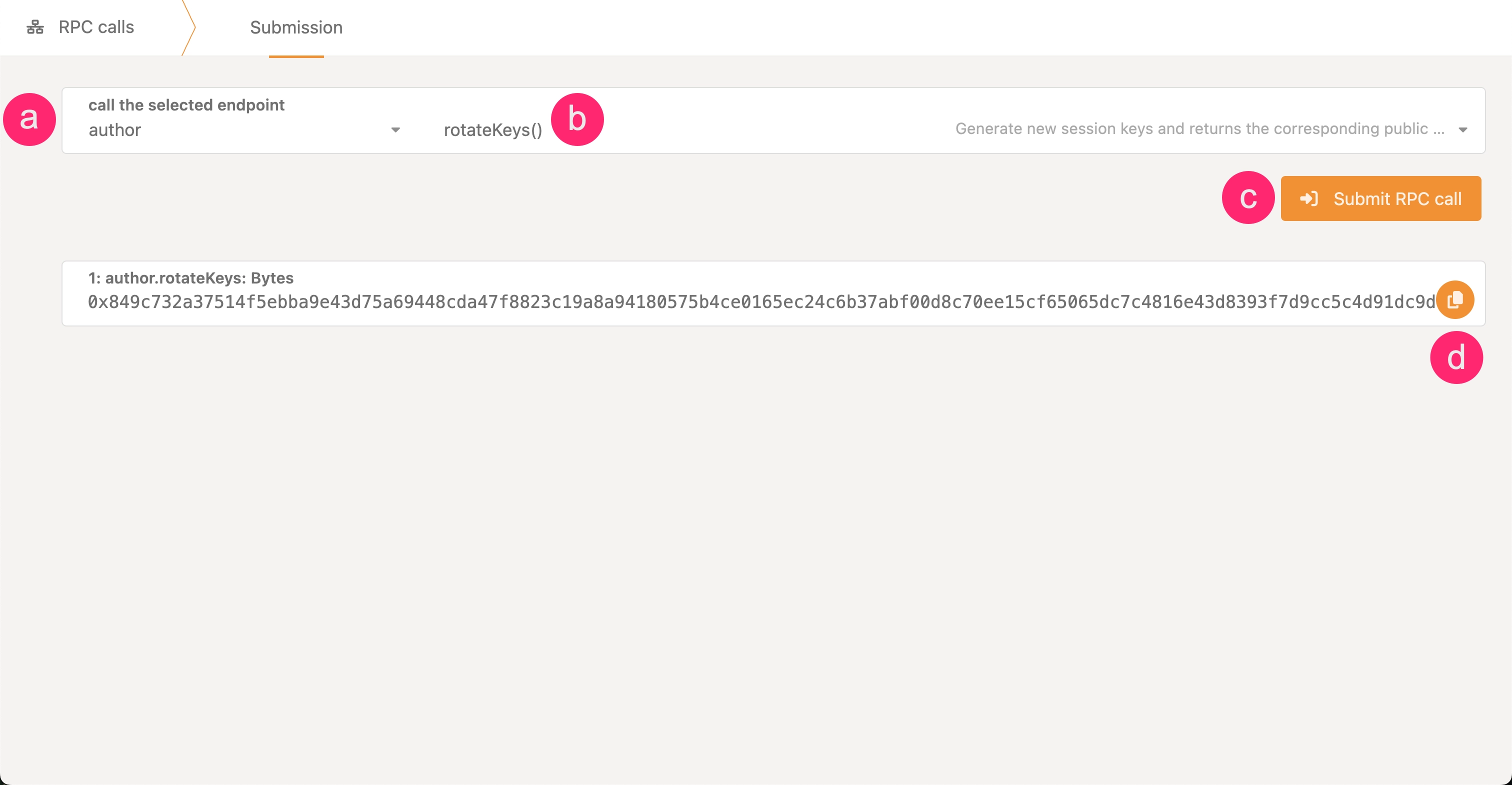
1. In Polkadot.js Apps, connect to your local node, navigate to the **Developer** dropdown, and select the **RPC Calls** option.
2. Construct an `author_rotateKeys` RPC call and execute it:
1. Select the **author** endpoint.
2. Choose the **rotateKeys()** call.
3. Click the **Submit RPC Call** button.
4. Copy the hex-encoded public key from the response.
=== "Curl"
Generate session keys by running the following command on your node:
``` bash
curl -H "Content-Type: application/json" \
-d '{"id":1, "jsonrpc":"2.0", "method": "author_rotateKeys", "params":[]}' \
http://localhost:9944
```
This command will return a JSON object. The `result` key is the hex-encoded public part of the newly created session key. Save this for later use.
```json
{"jsonrpc":"2.0","result":"0xda3861a45e0197f3ca145c2c209f9126e5053fas503e459af4255cf8011d51010","id":1}
```
=== "Subkey"
To create a keypair for your node's session keys, use the `subkey generate` command. This generates a set of cryptographic keys that must be stored in your node's keystore directory.
When you run the command, it produces output similar to this example:
subkey generate
        Secret phrase:       twist buffalo mixture excess device drastic vague mammal fitness punch match hammer
          Network ID:        substrate
          Secret seed:       0x5faa9e5defe42b201388d5c2b8202d6625a344abc9aa52943a71f12cb90b88a9
          Public key (hex):  0x28cc2fdb6e28835e2bbac9a16feb65c23d448c9314ef12fe083b61bab8fc2755
          Account ID:        0x28cc2fdb6e28835e2bbac9a16feb65c23d448c9314ef12fe083b61bab8fc2755
          Public key (SS58): 5CzCRpXzHYhuo6G3gYFR3cgV6X3qCNwVt51m8q14ZcChsSXQ
          SS58 Address:      5CzCRpXzHYhuo6G3gYFR3cgV6X3qCNwVt51m8q14ZcChsSXQ
To properly store these keys, create a file in your keystore directory with a specific naming convention. The filename must consist of the hex string `61757261` (which represents "aura" in hex) followed by the public key without its `0x` prefix.
Using the example above, you would create a file named:
```
./keystores/6175726128cc2fdb6e28835e2bbac9a16feb65c23d448c9314ef12fe083b61bab8fc2755
```
And store only the secret phrase in the file:
```
"twist buffalo mixture excess device drastic vague mammal fitness punch match hammer"
```
When submitting `setKeys`, use `0x00` as the proof parameter.
!!! warning "Save your session key output immediately"
You must save these session keys as you'll need them for on-chain registration.
Calling `author_rotateKeys` or `author_rotateKeysWithOwner` generates **new keys every time** — it does not return previously generated keys. If you lose the output, there is no way to retrieve it. You will need to call the RPC again, which generates a fresh set of keys, and then re-submit `setKeys` with the new result.
### Submit Transaction to Set Keys
After generating your session keys (and proof, if using runtime 2.2.0+), you must submit them on-chain. There are two paths for submitting session keys:
=== "Polkadot Hub (Recommended)"
The recommended approach is to use the `stakingRcClient.set_keys` extrinsic on Polkadot Hub. This path is required for validators using pure proxy stash accounts or [Staking Operator proxies](/node-infrastructure/run-a-validator/operational-tasks/staking-operator-proxy/).
=== "Runtime 2.2.0+"
1. In Polkadot.js Apps, connect to **Polkadot Hub** (Asset Hub).
2. Navigate to **Developer > Extrinsics**.
3. Select your stash account (or submit via proxy).
4. Choose the **stakingRcClient** pallet and the **setKeys** extrinsic.
5. Enter the following parameters:
- **`keys`**: The session keys hex string returned by `author_rotateKeysWithOwner`.
- **`proof`**: The proof hex string returned by `author_rotateKeysWithOwner`.
- **`maxDeliveryAndRemoteExecutionFee`**: Optional maximum fee for the XCM message to the relay chain. Can be left as `None`.
6. Submit and sign the transaction.
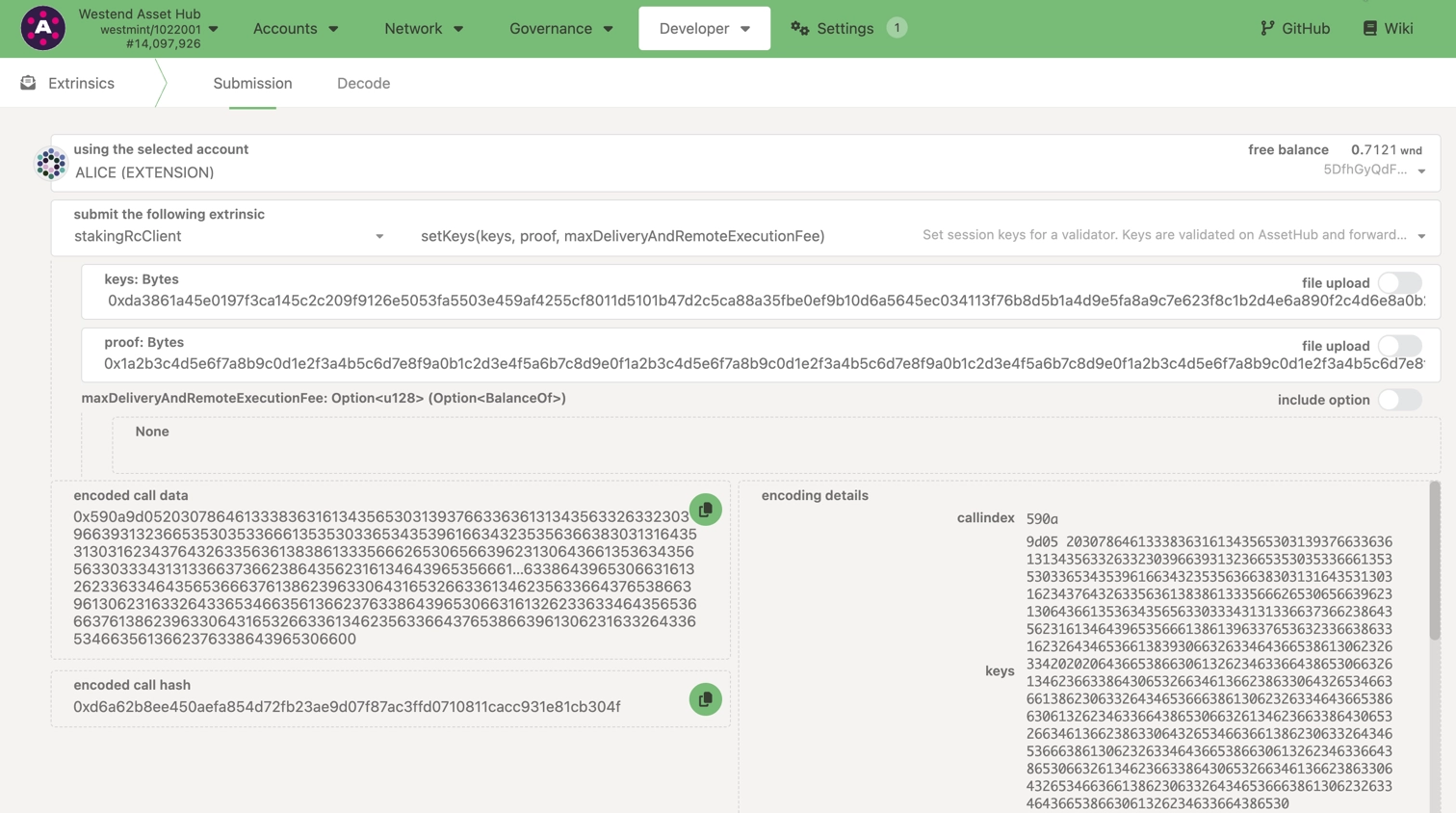
Polkadot Hub validates the proof locally and forwards the keys to the relay chain via XCM.
=== "Pre-2.2.0"
1. Go to [Polkadot.js Apps](https://polkadot.js.org/apps/) and connect to Polkadot Hub.
2. Navigate to **Developer > Extrinsics**.
3. Select the account that controls your validator (your stash or proxy account).
4. Choose the **stakingRcClient** pallet and the **setKeys** extrinsic.
5. Paste the hex-encoded session key string returned by `author_rotateKeys` into the **keys** field.
6. Set the **proof** field to `0x` (empty proof).
7. Submit the transaction.
!!! note
Setting session keys on Polkadot Hub requires a deposit of approximately 60 DOT (or ~2 KSM on Kusama). This deposit is only released when you call `stakingRcClient.purgeKeys` on Polkadot Hub — purging keys via the relay chain (`session.purgeKeys`) does not release this deposit.
=== "Relay Chain (Legacy)"
You can also submit session keys directly on the relay chain using `session.setKeys`. **This path will be removed in a future runtime upgrade** (see [polkadot-fellows/runtimes#1212](https://github.com/polkadot-fellows/runtimes/pull/1212)). Migrate to the Polkadot Hub path above.
=== "Runtime 2.2.0+"
1. In Polkadot.js Apps, connect to the **relay chain**.
2. Navigate to **Developer > Extrinsics**.
3. Select your stash account.
4. Choose the **session** pallet and the **setKeys** extrinsic.
5. Enter the following parameters:
- **`keys`**: The session keys hex string returned by `author_rotateKeysWithOwner`.
- **`proof`**: The proof hex string returned by `author_rotateKeysWithOwner`.
6. Submit and sign the transaction.
=== "Pre-2.2.0"
1. Go to the **Network > Staking > Accounts** section on [Polkadot.js Apps](https://polkadot.js.org/apps/#/staking/actions) connected to the relay chain.
2. Select **Set Session Key** on the bonding account you generated earlier.
3. Paste the hex-encoded session key string returned by `author_rotateKeys` (from the Polkadot.js Apps UI, curl, or Subkey) into the input field and submit the transaction.
!!! warning "Removal planned"
Both `session.setKeys` and `session.purgeKeys` on the relay chain will be **removed** in a future runtime upgrade ([polkadot-fellows/runtimes#1212](https://github.com/polkadot-fellows/runtimes/pull/1212)). Migrate to the Polkadot Hub path: use `stakingRcClient.setKeys` to set keys and `stakingRcClient.purgeKeys` to purge them.
Once the transaction is signed and submitted, your session keys will be registered on-chain.
### Verify Session Key Setup
To verify that your session keys are properly set, you can use one of two RPC calls:
- **`hasKey`**: Checks if the node has a specific key by public key and key type.
- **`hasSessionKeys`**: Verifies if your node has the full session key string associated with the validator.
For example, you can [check session keys on the Polkadot.js Apps](https://polkadot.js.org/apps/#/rpc) interface or by running an RPC query against your node. Once this is done, your validator node is ready for its role.
## Set the Node Key
Validators and collators on Polkadot need a static network key (also known as the node key) to maintain a stable node identity.
This key ensures that your node can maintain a consistent peer ID, even across restarts, which is crucial for maintaining reliable network connections.
Starting with Polkadot version 1.11, validators without a stable network key may encounter the following error on startup:
polkadot --validator --name "INSERT_NAME_FROM_TELEMETRY"
Error:
0: Starting an authority without network key
This is not a safe operation because other authorities in the network may depend on your node having a stable identity.
Otherwise these other authorities may not being able to reach you.
If it is the first time running your node you could use one of the following methods:
1. [Preferred] Separately generate the key with: INSERT_NODE_BINARY key generate-node-key --base-path INSERT_YOUR_BASE_PATH
2. [Preferred] Separately generate the key with: INSERT_NODE_BINARY key generate-node-key --file INSERT_YOUR_PATH_TO_NODE_KEY
3. [Preferred] Separately generate the key with: INSERT_NODE_BINARY key generate-node-key --default-base-path
4. [Unsafe] Pass --unsafe-force-node-key-generation and make sure you remove it for subsequent node restarts
### Generate the Node Key
Follow these steps to generate a node key:
1. Generate your node key using one of the following options:
=== "Docker"
```bash
docker run --rm parity/subkey:latest generate-node-key > node.key
```
=== "polkadot binary"
```bash
polkadot key generate-node-key --file node.key
```
2. Locate your peer ID in the displayed output. The peer ID is similar to this example:
```text
12D3KooWExcVYu7Mvjd4kxPVLwN2ZPnZ5NyLZ5ft477wqzfP2q6E
```
Be sure to save the peer ID for future reference.
### Set Node Key
After generating the node key, configure your node to use it by specifying the path to the key file when launching your node. Add the following flag to your validator node's startup command:
``` bash
polkadot --node-key-file INSERT_PATH_TO_NODE_KEY
```
Following these steps ensures that your node retains its identity, making it discoverable by peers without the risk of conflicting identities across sessions. For further technical background, see Polkadot SDK [Pull Request #3852](https://github.com/paritytech/polkadot-sdk/pull/3852) for the rationale behind requiring static keys.